Monday, April 13th, 2020 .

The worldwide coronavirus pandemic has demonstrated just how important it is for businesses to manage what we used to consider minor details: the spaces we occupy, the items we touch, and the people we come into contact with.

But for manufacturers, distributors, and logistics professionals, there’s no detail too small to be optimized—and that’s been true for far longer than the modern world has combatted highly contagious illnesses like COVID-19, SARS, or Swine Flu. Since the 1960s, supply chains and production lines around the globe have adopted a leaner operation. It’s called just-in-time manufacturing, or JIT. 

What is JIT?

Just-in-time manufacturing is built on the principles popularized by Toyota’s production processes in Japan. It’s also known as continuous-flow or demand-flow manufacturing.

No matter the name, its goal is the same: JIT seeks to make production more efficient by ensuring that materials and finished products are always in transit rather than sitting around, waiting to be used. This decreases business overhead because goods in this system require less storage space.

It also makes for a smoother production process. Raw materials arrive the moment they are needed. Finished goods are shipped out as soon as they’re completed. There’s no lag time, no costly delays, and no square footage going to waste.

How to use just-in-time principles to fight COVID-19 (and improve your customer’s waiting experience)

Other businesses, from retail stores to restaurants, doctor’s offices to mechanic shops can put the principles that power JIT to work for both their bottom line and the overall safety and satisfaction of their customers. Watilist Me is a simple tool to make some of these concepts easy to implement.

Here are five ways your business can use Waitlist Me today to smooth out the kinks in your waiting process:

  1. Let customers wait elsewhere. Waitlist Me makes it simple to text customers when ready for them and see their replies. That means you customers don’t need to be crowded in a waiting area. They can wait in their car or somewhere nearby. 
  2. Keep queuers in the know. Our public waitlist feature lets your customers check their spot in line from their smartphone. With just a few taps, they can see their ETA and plan their arrival at your business just in time to be served.
  3. Add guests on the go. With the add-yourself web widget, individuals can hop on your waitlist from wherever they are, whether that’s home, in transit, or in the car in your parking lot.
  4. Educate customers on pick-up policies. When you add someone to your queue, Waitlist Me can send an automatic text confirmation. You can customize the information in this text to include coronavirus-specific instructions, like how to facilitate your no-contact pick-up service.
  5. Confirm details using two-way texting. Waitlist Me Pro and Platinum allow businesses to send custom text responses to their customers. You can use this feature to clarify orders, pick-up instructions, or any other questions guests may have.

Thursday, December 6th, 2012 .

downloadRed Robin fans, we have great news. The NoshList waitlist app has now been successfully integrated into all Red Robin International, Inc. company-owned restaurants nationwide.

Red Robin International, Inc. currently operates more than 330 company-owned Red Robin® restaurants and chose NoshList based on its industry-leading proprietary telephony technology. Similar to other multi-unit restaurants, Red Robin traditionally used pen-and-paper waitlists and microphone systems to address diners waiting to be seated. Prior to using NoshList, the casual dining chain experienced significant surges in both the front and back of house relative to guest flow during peak times. In February, Red Robin deployed NoshList to 50 locations, quickly rolling out to the remaining company-owned restaurants within 60 days due to the remarkable results.

“Beyond the benefits of waitlist management and improvement in guest experience, restaurants where NoshList had been deployed realized increased seating efficiencies and improved ticket flow through the kitchen making the decision to deploy NoshList to our other locations a no-brainer,” stated Chris Laping, Senior Vice President of Business Transformation and Chief Information Officer for Red Robin International, Inc. “For diners, this translates to shorter wait times, as the time that tables sit empty between parties is minimized to less than 30 seconds in some cases, and improved ticket times, as order flow through the kitchen is steadied.”

Red Robin also selected NoshList as its preferred front-of-house, guest management technology platform because of its simple and intuitive interface, which allows restaurants to implement quickly. The ability for restaurant operators to implement and train staff within minutes minimizes the resources that restaurants typically have to allocate to the introduction of a new piece of technology. Restaurants are better equipped to forecast expenses without worry of increases relative to changes in diner traffic.

Understanding that deployment of technology for multi-unit restaurants is no easy feat, NoshList, through a partnership with iPadEnclosures.com, has designed a “push-button” distribution strategy that can provide restaurants with up to 500 fully provisioned iPads within 7 days. “During phase one of our roll out to Red Robin, NoshList was able to provide 125 fully provisioned iPads to 55 Red Robin locations in a number of days,” says Cody Rose, Director of Restaurant Solutions for Firespotter Labs. “iPads arrived at each specified location provisioned with NoshList and preconfigured with a number of additional options including corporate 3G and/or wifi connectivity settings, screen protectors, a protective iPad Enclosure complete with mounting mechanism, and a free multi-device management solution (‘MDM’) for a truly out-of-box solution that allowed each restaurant to be up and running with NoshList within minutes.”

Wednesday, April 8th, 2015 .

Have a Kindle Fire at home?  Now you can run your waitlist and schedule reservations for your business on your Kindle. Just go to the Kindle app store and search for Waitlist Me to get started.

kindle waitlist me


Waitlist Me has been on the Android platform for a while, but historically the Kindle has been more of a consumer rather than a business device.  Recently though, we have seen businesses start to use Kindles more in work environments, and decided to make our app available in the Kindle store. Amazon has added a number of security and IT-friendly features to Kindles including Mobile Device Management Compatibility, Device Encryption, VPN, Single Sign-On, and more, making them more enterprise-ready for businesses.

Running Waitlist Me on a Kindle Fire, with its more portable form factor, can be a nice option extra device for managers that might be walking around the restaurant.  By logging into the same account, it will automatically sync with other devices the business may be using.  The 6 inch Kindle Fire is also very cost effective at only $99 dollars.

Tuesday, February 2nd, 2016 .

Building on the set of resource management features we rolled out a couple months ago, we have added more flexibility for creating and tracking custom resource statuses. These statuses can be used to visually highlight different stages of your occupied resources in different colors to help make assignment decisions faster and easier.

Here is a new video on resource management, including the new custom statuses:


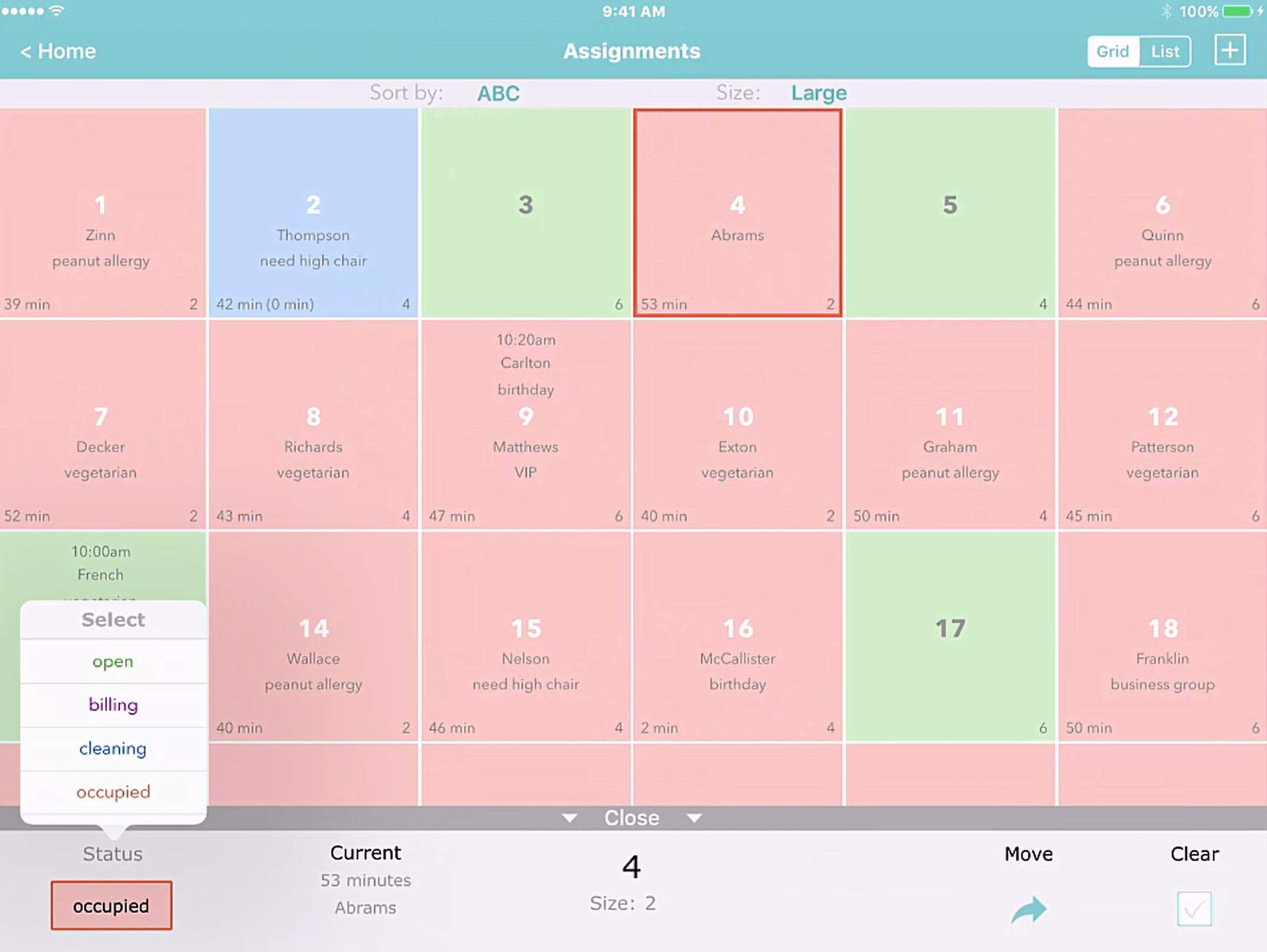
For example, say you are managing restaurant tables and using Waitlist Me to view what tables are available or occupied. You can sort tables by the times they have been occupied for a better sense of which ones will become available first. Now with custom statuses you could improve on those estimates even more by changing the states of tables that are waiting for their bill or being cleaned. Marking tables with customers waiting for their checks as “billing” can give your bus boys a heads up on which tables would need cleaning soon. Similarly, you can change the status of tables to “cleaning” when they are being cleared and prepped. Using more detailed statuses can help your staff at the front of the house know what tables will be available soon, which means they can quote better wait time estimates and seat customers faster. This means more revenue for the restaurant through more table turns and improved customer satisfaction.

This is just one example of how it might work in a restaurant, but the flexibility of the naming and usage of statuses means they can be tailored to different processes in different businesses.

To change a status in Waitlist Me, all you have to do is press on the resource and an action bar will appear at the bottom of the screen. This area shows information on customers currently occupying and waiting for the resource, and has actions for moving and clearing customers. Pressing on the status on the left will bring up a list of statuses, and selecting one will change the status and color of the resource. In the list view, just tap on the status color to change it.

status - full view


Note that when you choose a custom status you can see both the total time a resource has been occupied as well as the time spent in the current status, which is shown in parenthesis. This makes it easy to see total visit times and times in specific statuses at a glance, so you can tell if a certain stage is causing more delays than others and how that might be affecting total wait times.

Accompanying the custom statuses are a couple of new sorting options in the Grid view, where you can view your resources grouped by Status. Select “Status the ABC” to have all the statuses grouped together and then ordered alphabetically by the resource name or “Status then Time” to have them ordered by the length of time they have been in that particular status.

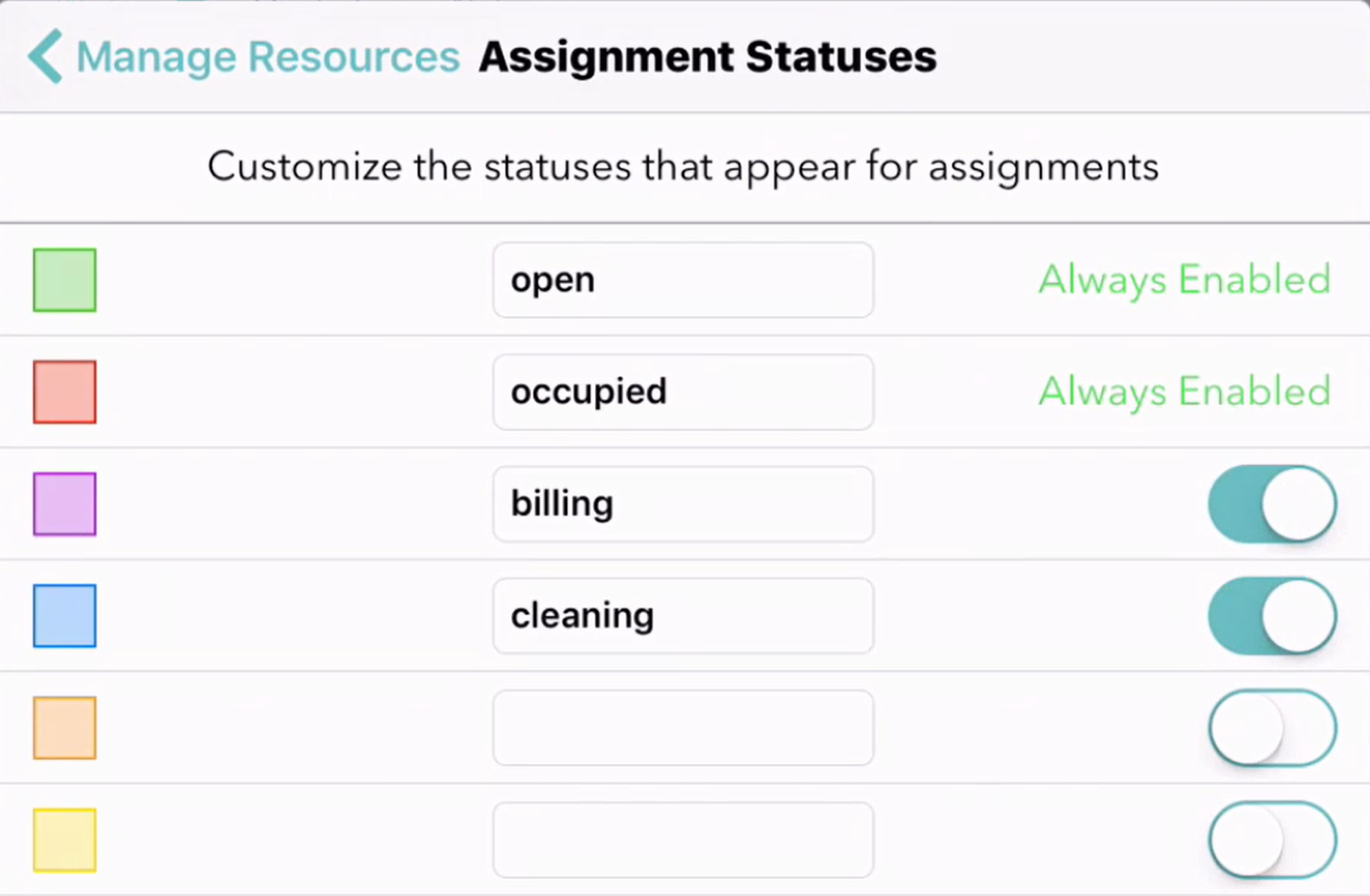
To customize your statuses, go to your Settings and then press on “Manage Resources” and then again on the “Statuses” in the upper right. In addition to the default “available” (green) and “occupied” (red) statuses, you can add four of your own statuses. Just add the names and move the sliders on the right to turn them on or off. Statuses will show alphabetically in the options when you select them, so you can set the naming accordingly. The green and red statuses for available and occupied resources are always required, and custom statuses are treated as states of an occupied resource.

status - settings


Friday, March 9th, 2018 .

College students might be coffee-gulping their way through mid-terms, but it’s not exams you’re worried about. Nope, it’s the week after exams that’s got you crossing your fingers and double-checking your inventory. Spring break is almost here, and if you manage a hotel in any of the United States’ many sun-soaked destinations, making it through the rowdiest 7 days of the year is all you can think about.

Take a deep breath, though, boss. Waitlist Me is here to help you make everything go according to plan. Here’s exactly how you can put it to work when the college kids descend.

Cater to your millennial crowd with free texting features

Why talk when you can text? That’s the millennial mindset. You get it, and so do we.

Waitlist Me Premium offers unlimited texting that allows you to notify your guests when you’re ready for them.  It also lets them text back simple replies to let you know if they’re on their way or need to give up their spot on the list. It’s simple and it’s already set up for you, making it your no-brainer communication method of choice this spring break.

Juggle walk-ins and reservations at property restaurants

Go ahead and toss your grease pen and reservation book in the trash—Waitlist Me is all you need. Booking ahead can be touch-and-go, but your younger guests might just surprise you.

Our app lets your on-property restaurants manage both reservations and a waitlist on one simple screen. And because Waitlist Me makes it easy to see how many people are waiting and how long they have been waiting, you’ll be able to quote a more accurate wait time or ETA to anyone who walks through your door.

Prevent hostess stand pile-ups with on-the-go waitlists

Waitlist Me Premium does its best to keep your hosts focused on customer service, not fielding “add me to the list!” phone calls and requests for wait time updates from a hoard of waiting guests.

How? With two key features. You can add our Web Widget to your website or social media account to let folks join your waitlist from wherever they are, whenever they want, like when from their hotel room as they’re heading down to dinner. Once they’ve joined the list, the Public Waitlist lets them see from their phone where they are in line without flagging down your staffers. And you don’t have to do anything.

Organize special events and programming

From pub trivia in Panama City Beach to karaoke nights in Las Vegas, we know you’ve got a slew of crowd-pleasers lined up for your spring breakers. Our app lets your guests party it up exactly the way you intended, without worrying about missing their time in the spotlight.

Waitlist Me Premium allows you to set up a self-check in kiosk on an iPad or Android tablet, where people can sign up for your offerings on their own time, and then head back to their table to yuk it up with their pals while they wait. Pair it with a public waitlist display on any available monitor or television, and your party prep can’t get any easier.

Eliminate the beach-chair (or pool deck) free-for-all

Mayhem? Not on your watch. Keeping track of your offerings helps you ensure that you’re making the most of them—and that you know what’s getting the most use and what’s falling by the wayside.

Waitlist Me Pro keeps your hotel property’s playground organized, no matter if you’re tracking lounge chairs or umbrellas, jet skis or volleyball courts. Scattered single seats nobody wants to take? Not with you in charge. Frustrated game-players tired of waiting their turn? Forget about it. Now, they know they can hit the snack bar before their next game.