Wednesday, February 25th, 2026 .

Running a successful restaurant means juggling a lot of moving parts, and managing the dining room floor is often one of the most challenging. Double-bookings, awkward overlaps, and unpredictable table turnover can quickly turn a great service into a stressful one.

Enter Duration Rules—a smart feature within Advanced Scheduling Rules designed to automate and optimize your table management.

Here is a breakdown of what Duration Rules are, how they work, and how they help your business.


What Are Duration Rules?

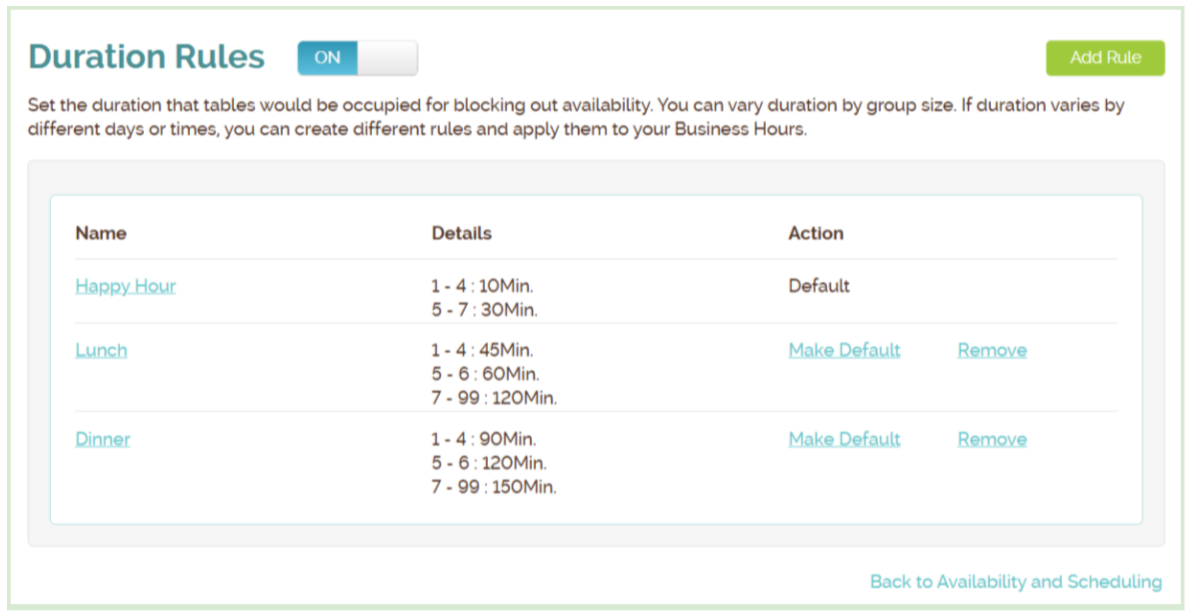
At their core, Duration Rules allow businesses to automatically control exactly how long a table is reserved based on the size of the party or the time of day.

Working seamlessly with your Table Management and Capacity Utilization tools, these rules calculate availability and assign tables automatically. This means your system can make reliable, split-second decisions during customer self-scheduling without any manual math or intervention from your staff.

The Magic Behind the Scenes: How They Work

When a customer attempts to book a table through your self-scheduling portal, the system follows a precise, automated logic:

  1. Identifies the party size: The system notes how many guests are arriving.
  2. Applies the rule: It looks at your predefined settings to find the correct duration for that party size.
  3. Blocks the table: The specific table is reserved for that exact calculated time limit.
  4. Checks availability: It instantly ensures no other reservations can overlap with this block.
  5. Updates the customer: If no suitable table is available for the full duration of their requested time, that time slot is hidden or marked unavailable to prevent double-booking.

Customizing for the Rush: Time-Based Duration Rules

Not all service periods are created equal. Customers might want a quick bite during their lunch hour, but prefer to linger over a multi-course meal at dinner. Duration Rules can be customized to reflect these different dining habits.

By creating separate rules and applying them to specific blocks in your Business Hours settings, you can maximize efficiency.

Why Duration Rules Matter

By implementing Duration Rules, you ensure that the availability your customers see online perfectly matches the real capacity of your dining room, even during the Friday night rush.

The immediate benefits for your business include:

  • Preventing double bookings: No more apologizing for a table not being ready.
  • Reflecting realistic dining times: Tailoring your turnover expectations to the actual time of day.
  • Improving the guest experience: Customers are seated promptly, and dining rooms feel well-managed.
  • Reducing staff workload: Hosts can focus on greeting guests rather than playing calendar tetris.
  • Enabling reliable self-scheduling: You can trust the system to run on autopilot.

Sunday, February 8th, 2026 .

Running a busy restaurant is a balancing act. You want to fill every seat, but you also need to keep your best tables open for VIPs or ensure your staff isn’t overwhelmed by a sudden rush in one single section. Our new Availability and Priority feature gives you the tools to automate your seating strategy exactly how you want it.

Control Your Online Bookings

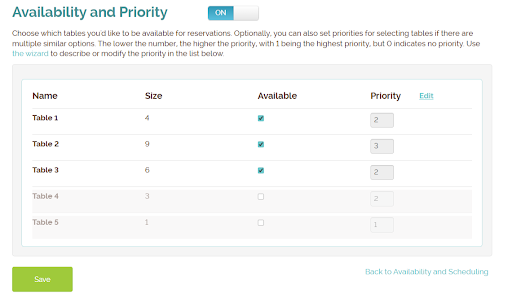
Not every table needs to be available for online booking. With the Availability setting, you decide which tables the system can auto-assign to self-service customers and which ones you want to hold back for walk-ins or special manual assignments. It’s the easiest way to protect your “power tables” or manage capacity during peak shifts.

Smart Auto-Assignment

When a reservation comes in, who gets the best seat? With Priority, you set the rules.

  • Priority 1 tables are filled first.
  • Higher numbers act as a fallback.
  • Priority 0 keeps tables hidden until every other option is exhausted.

Strategies That Work

Whether you want to fill your most popular window seats first, keep a section clear for a private event, or spread guests evenly across the room to balance the workload for your servers, this feature handles the logic for you.

Getting Started

Ready to optimize your seating? Just head to Account → Settings → Availability and Scheduling → Advanced Scheduling Rules to start setting your priorities.

Saturday, January 24th, 2026 .

Efficiency is key to a profitable restaurant, especially during peak hours. Waitlist Me’s “Capacity Utilization” feature is an advanced scheduling tool designed to solve a common headache for hosts and managers: the inefficient use of tables.

Here is a breakdown of how this feature helps businesses optimize their seating automatically.

What is Capacity Utilization?

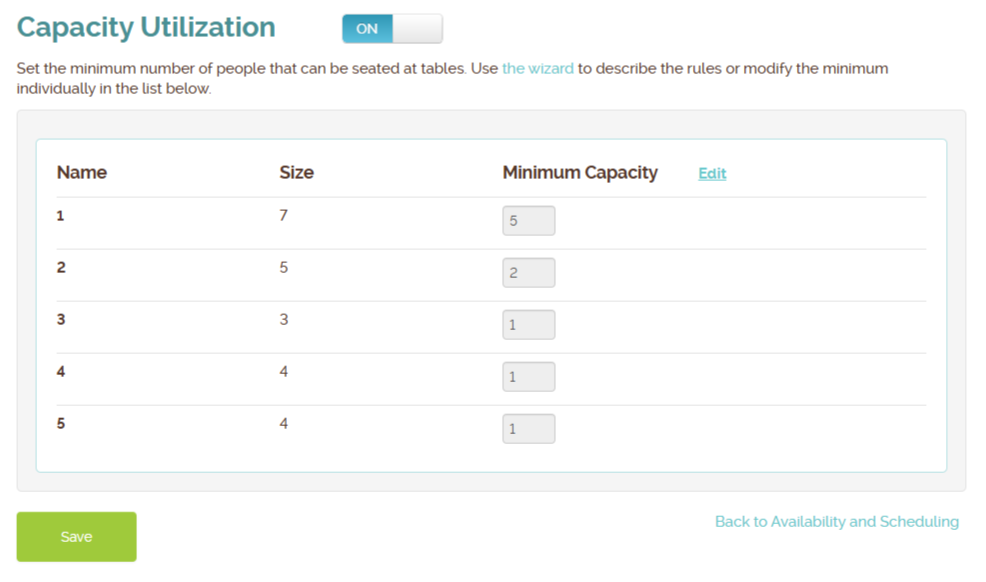
At its core, this feature is an automated gatekeeper for your table assignments. It allows you to set “minimum party size” rules for specific tables. When a customer schedules a reservation online, the system checks these rules in real-time to ensure that small parties don’t block large tables.

Key Benefits:

  1. Prevent Inefficient Seating: Stops a party of two from booking an eight-top, saving that inventory for larger, more profitable groups.
  2. Reduce Manual Work: Hosts no longer need to play “table Tetris” or manually intervene to move reservations around; the system assigns the best-fit table automatically.
  3. Smart Self-Scheduling: If the only tables available are too large for a requested party size (based on your rules), the system will simply hide that time slot from the customer, preventing a bad booking before it happens.

How It Works in Practice

Imagine a busy Friday night between 7:00 PM and 9:00 PM. You have two large tables (Table 1 and Table 2) that fit up to 8 people, but you’ve set a rule that they require a minimum of 5 guests.

  1. Scenario A: A customer tries to book for 5 people. The system sees Table 1 is free and fits the criteria, so it instantly confirms the booking and assigns them to Table 1.
  2. Scenario B: A second customer tries to book for 2 people. The system checks the inventory. While a large table is free, the customer does not meet the “minimum party size” rule. The system shows no availability for that time slot, preserving your large tables for big groups.
  3. Scenario C: A third customer tries to book for 8 people. The system sees Table 1 is taken but Table 2 is free, so it assigns them to Table 2.

Why You Should Use It

This feature is ideal for restaurants with predictable table layouts who want to “set it and forget it.” By automating these decisions, you protect your revenue-generating large tables, stabilize kitchen flow, and ensure your staff can focus on service rather than reservation management.

Tuesday, August 12th, 2025 .

The restaurant world is getting a tech upgrade, and it’s powered by AI. OpenTable’s new AI Concierge feature is a big step forward in exposure of the new type of capabilities that are now possible with vertically integrated AI, and it follows the type of features we proved were possible when we launched Perklist’s AI Assistant earlier this year in March.

OpenTable’s Concierge: Summarizing User Reviews

OpenTable, the go-to for reservations, has introduced its AI-powered Concierge. This assistant is integrated directly into the OpenTable app and website and is designed to answer a diner’s questions about a restaurant, like “What are popular dishes?” or “Can I get a vegetarian meal here?” It’s a handy tool that saves diners from having to call the restaurant or dig through different websites.

However, a key point here is where the Concierge currently gets much if not all of its information from customer reviews. The big advantage of this approach is it works with data that OpenTable already has for the restaurants using its platform, but it can be a bit of a double-edged sword for a restaurant. The AI might provide details based on a past review that may not be entirely accurate or up-to-date. A restaurant has less direct control over how this information is presented, and the AI’s response might not always perfectly align with what the business wants to communicate. Still the simplicity of just turning on this feature for existing customers with many reviews is key, and OpenTable can allow restaurants to refine or better control the feature over time.

Perklist’s AI Assistant: Utilizing Restaurant Menus and Other Information

On the other side, Perklist offers an AI Assistant that’s all about empowering the restaurant. This tool is a chatbot that a business can add to its own website and gives more control to the restaurant in the menu and other information it uses for its interactions with customers.

To set it up, you simply upload your own official menu, product list, or other business information. The AI assistant then uses this exact information—and only this information—to answer customer questions. A restaurant can also add custom details about their policies, FAQs, and hours. This means that a customer’s question about a specific menu item will be answered with the restaurant’s own description, not with an interpretation from an online review. Perklist puts the business directly in the driver’s seat, ensuring the message is always accurate and on-brand, and makes it easy to update and keep the information accurate and aligned with the business goals.

Tuesday, April 8th, 2025 .

For businesses using Waitlist Me’s public waitlist feature that allows people who’ve joined your waitlist to check their place in line from their phones, there is a new way to enhance the customer experience.

Now, an integration with the Perklist AI Assistant makes it possible for these waiting customers to explore your menu and ask questions directly from that public waitlist page.

When enabled, a simple message and link will appear above their wait time information. Clicking this link opens a chat with an AI Assistant capable of answering questions about your menu and business in real time. You can find more details and an overview video here of how the Perklist AI Assistant works.

Setting up the AI Assistant involves providing it with your menu and other relevant details, a process that generally takes a few minutes. There are also options to customize the text of the message and link shown on your public waitlist page. Additionally, you can choose whether customers see only the AI Assistant chat or both your menu and the chat window when they click the link.

Perklist is a service developed by Waitlist Me, aimed at helping businesses improve their digital interaction with customers, and includes features beyond just the AI Assistant.