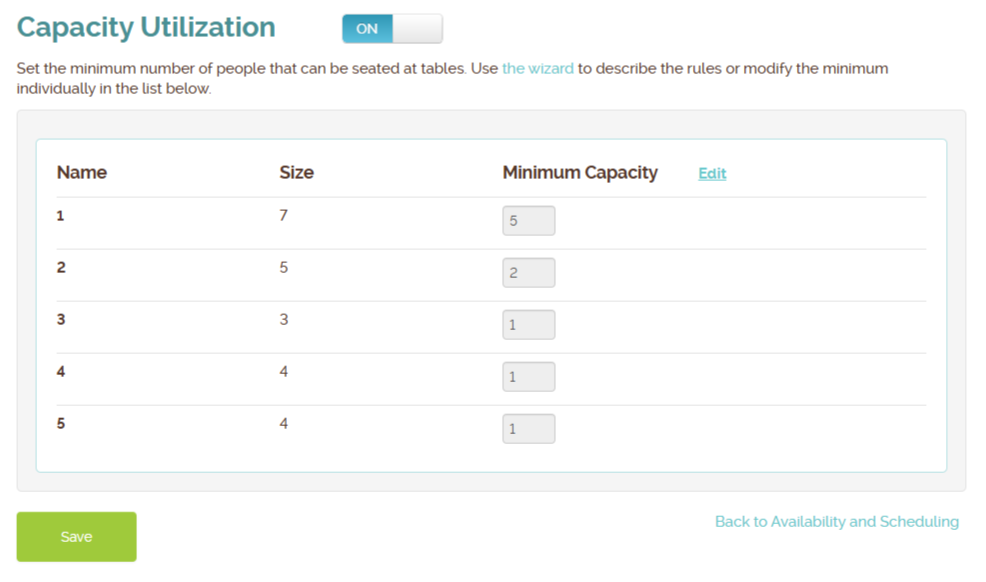
Efficiency is key to a profitable restaurant, especially during peak hours. Waitlist Me’s “Capacity Utilization” feature is an advanced scheduling tool designed to solve a common headache for hosts and managers: the inefficient use of tables.
Here is a breakdown of how this feature helps businesses optimize their seating automatically.
What is Capacity Utilization?
At its core, this feature is an automated gatekeeper for your table assignments. It allows you to set “minimum party size” rules for specific tables. When a customer schedules a reservation online, the system checks these rules in real-time to ensure that small parties don’t block large tables.
Key Benefits:
- Prevent Inefficient Seating: Stops a party of two from booking an eight-top, saving that inventory for larger, more profitable groups.
- Reduce Manual Work: Hosts no longer need to play “table Tetris” or manually intervene to move reservations around; the system assigns the best-fit table automatically.
- Smart Self-Scheduling: If the only tables available are too large for a requested party size (based on your rules), the system will simply hide that time slot from the customer, preventing a bad booking before it happens.
How It Works in Practice
Imagine a busy Friday night between 7:00 PM and 9:00 PM. You have two large tables (Table 1 and Table 2) that fit up to 8 people, but you’ve set a rule that they require a minimum of 5 guests.
- Scenario A: A customer tries to book for 5 people. The system sees Table 1 is free and fits the criteria, so it instantly confirms the booking and assigns them to Table 1.
- Scenario B: A second customer tries to book for 2 people. The system checks the inventory. While a large table is free, the customer does not meet the “minimum party size” rule. The system shows no availability for that time slot, preserving your large tables for big groups.
- Scenario C: A third customer tries to book for 8 people. The system sees Table 1 is taken but Table 2 is free, so it assigns them to Table 2.
Why You Should Use It
This feature is ideal for restaurants with predictable table layouts who want to “set it and forget it.” By automating these decisions, you protect your revenue-generating large tables, stabilize kitchen flow, and ensure your staff can focus on service rather than reservation management.