Running a busy restaurant is a balancing act. You want to fill every seat, but you also need to keep your best tables open for VIPs or ensure your staff isn’t overwhelmed by a sudden rush in one single section. Our new Availability and Priority feature gives you the tools to automate your seating strategy exactly how you want it.
Control Your Online Bookings
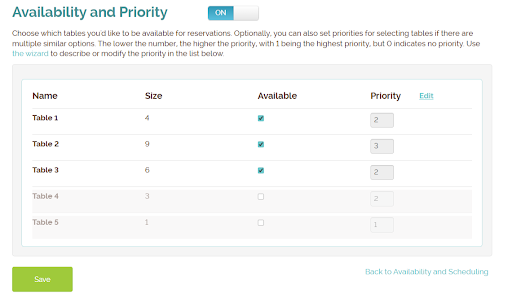
Not every table needs to be available for online booking. With the Availability setting, you decide which tables the system can auto-assign to self-service customers and which ones you want to hold back for walk-ins or special manual assignments. It’s the easiest way to protect your “power tables” or manage capacity during peak shifts.
Smart Auto-Assignment
When a reservation comes in, who gets the best seat? With Priority, you set the rules.
- Priority 1 tables are filled first.
- Higher numbers act as a fallback.
- Priority 0 keeps tables hidden until every other option is exhausted.
Strategies That Work
Whether you want to fill your most popular window seats first, keep a section clear for a private event, or spread guests evenly across the room to balance the workload for your servers, this feature handles the logic for you.
Getting Started
Ready to optimize your seating? Just head to Account → Settings → Availability and Scheduling → Advanced Scheduling Rules to start setting your priorities.